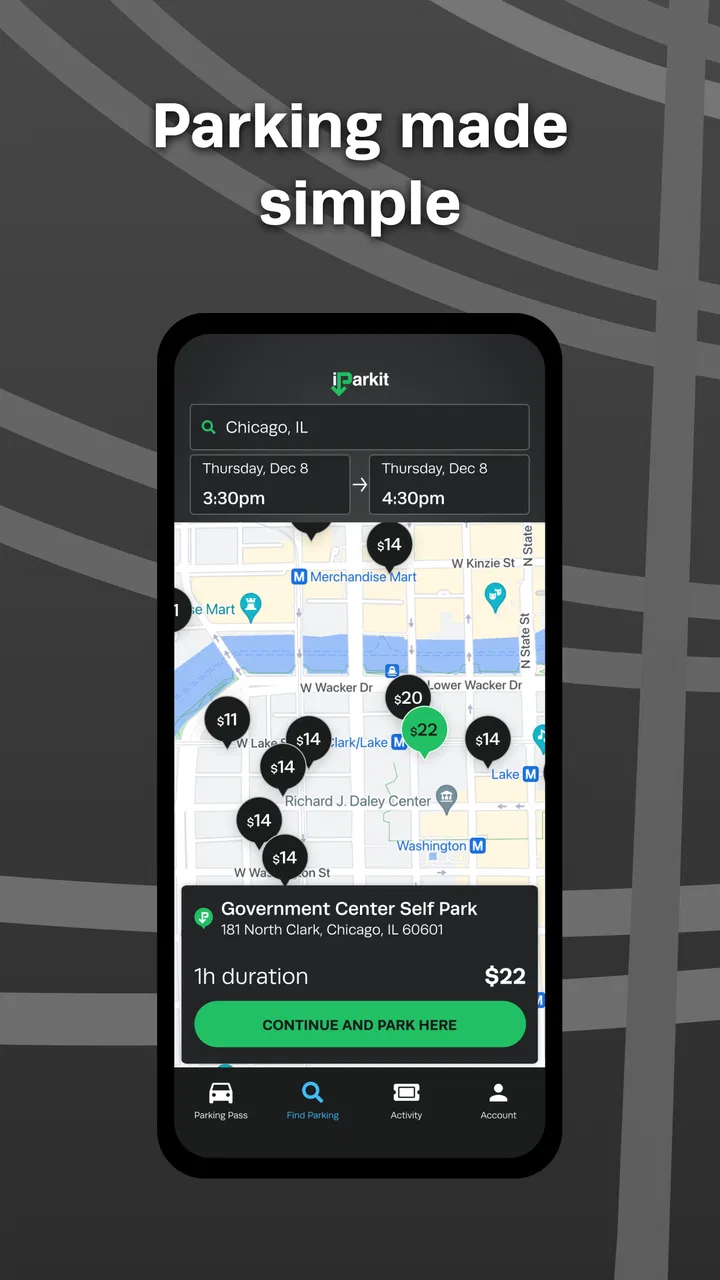
iParkit Garage Parking
- 4.4
- Rating
- 100.00K
- Installs
- Free
- Price

 Analysis by App-foxy
Parking apps are easy to judge after a quick glance, but I find their real value appears during the small, stressful moments: arriving downtown late, trying to remember where the car is, or coordinating a shared vehicle with someone else. I spent time looking at iParkit Garage Parking from that practical angle, and I came away with a fairly clear impression. It is a free Maps & Navigation app from InterPark, aimed at making garage parking easier rather than replacing every navigation tool on your phone.
That distinction matters. I would not treat it as a complete travel planner or as a universal answer for every parking situation. Its appeal is narrower and more useful: when a garage is part of your trip, an app focused on that experience can reduce some of the searching and last-minute uncertainty. The current version is 4.3.20, and it runs on Android 7.0 or later, which makes it accessible on many older devices still used as secondary phones in a household.
How iParkit fits a shared household parking routine
I find a shared-car routine works best when the parking decision has a clear owner: one person checks the plan before departure, and the driver gets one agreed destination rather than several competing suggestions. After the car is parked, a quick message with the garage details can make the handoff easier for whoever uses it next. That simple division of responsibility also raises a useful question: what should the household settle before putting the app on another phone?
You May Also Like

 Blood Strike: 2.5 Anniversary
Blood Strike’s Loadouts Turn Every Drop Into a Tactical Gamble
A close look at Blood Strike’s custom loadouts: how fast access to signature weapons reshapes its battle royale rhythm, rewards preparation, and narrows the gap between fights.

 Pandora - Music & Podcasts
Pandora’s Music Is Easy to Start, but Harder to Recover
Pandora’s strength is its low-effort path from a seed to a station. Its weak spot is how much confidence it asks you to place in connection, setup, and quiet recovery.

 8 Ball Pool
 Is Built on Rivalries, Rematches, and Routine
A close look at the rivalries, rematches, shared routines, and unanswered safety questions that turn a quick pool match into a persistent mobile community.

 Samsung Music
’s Quiet Strength Is Playing What You Already Own
Its reach comes less from spectacle than from dependable access to a personal library. That simplicity is both the app’s strongest retention engine and its ceiling.

 AccuWeather: Weather Radar
AccuWeather Review: A Quick, Clear Forecast for Everyday Decisions
For everyday plans, the best forecast is the one you can understand quickly. AccuWeather makes rain timing, radar, and local conditions easy to act on, with a few trade-offs.

 Hill Climb Racing
Why Hill Climb Racing Still Turns Crashes Into One More Run
A tiny car, a bumpy hill and one more upgrade: Hill Climb Racing keeps resurfacing because its simple chaos makes every near-miss feel personal.
More From Our News Desk



One car, several people, and a simple handoff
The most convincing use case for me is a shared car. Imagine one person driving downtown for an appointment while another family member needs the vehicle later. The driver can use the app as part of the parking routine, then communicate the garage choice and location through the household’s usual messaging method. The app does not need to become a family management system to be useful in that situation; it simply gives the driver a parking-focused reference point while the people involved handle the conversation separately.
That separation is important. I would not assume that installing the app on several phones creates a shared account, synchronized trip history, or automatic coordination. A household should decide who is responsible for checking the parking option, who is driving, and who needs the garage details afterward. In practice, that small agreement prevents a common problem: two people believing the other person has already handled the parking decision.
For a couple sharing one vehicle, I would use it before leaving rather than waiting until the car is already moving. One person can check the parking plan, while the driver concentrates on the road. If the driver is alone, the safest workflow is to make decisions while stationary. A parking app is helpful only when it reduces distraction, not when it encourages someone to search through screens in traffic.
It can also suit a household where one member is comfortable with navigation and another is not. A more confident user can help choose the garage before the trip and send the relevant details in a message. The person driving then has a clearer destination instead of having to explore unfamiliar parking choices at the last moment. This is a practical strength, but it comes from combining the app with sensible household coordination, not from assuming the app manages everyone automatically.
What to settle before installing it on another phone
Because the app is free and rated for Everyone, it is easy to imagine it being suitable for almost any family device. I would still establish a few boundaries before handing it to a child, an older relative, or someone who uses a shared tablet. Decide whether that device is being used for planning only or for active navigation, and make sure the driver knows that the person holding the phone is responsible for checking the final parking choice.
I also recommend agreeing on which phone is the main planning device. If several people independently search for a garage, the household may end up with conflicting plans. A shared routine works better when one person checks the destination, another confirms the timing, and the driver receives one clear instruction. This is especially useful when a family member borrows the car without being familiar with downtown streets.
On an older phone, I would test the app at home before relying on it during an important trip. The minimum operating system is Android 7.0, so compatibility is reasonably broad, but compatibility alone does not guarantee that an old device will feel quick or comfortable. Screen size, battery health, mobile connection, and the phone’s general condition all affect the experience. If the device is slow, use it to prepare the plan before leaving rather than treating it as a live decision-making tool.
Coordination is useful, but it is not automatic
One of the less obvious trade-offs is that a parking-focused app can clarify the destination without solving the communication problem around it. If a family member parks the car and another person later needs to collect it, the second person still needs the garage name, location, and any other details the driver chooses to share. I would send that information immediately after parking, while it is fresh, instead of expecting someone else to find the same result independently.
This workflow is also helpful for shared work vehicles or a car used by roommates. The person making the trip can check the parking plan, then pass on the decision in a group chat. The next driver does not need to repeat the entire search. That saves time and reduces disagreement, particularly when several garages appear to serve the same downtown destination.
At the same time, I would avoid treating the app as a live tracker for another person. Nothing about the basic description suggests that it should be used to monitor a family member’s location or to provide automatic arrival updates. If someone needs to know when the driver has arrived, use the household’s normal call or message routine. Keeping those roles separate makes the arrangement clearer and avoids giving the app responsibilities it was not designed to handle.
Age, trust, and responsible use
The Everyone content rating makes the app feel appropriate for general household use, including a teenager who needs help planning a trip or an older adult who wants a parking-oriented tool. Still, an age rating is not the same as driving readiness. I would not encourage a young passenger to interact with the phone while the vehicle is moving, and I would not assume that an older user will find every navigation step obvious without a little practice.
For a first-time user, I would walk through the process at home: open the app, identify the intended destination, review the available parking choice, and decide how the information will be shared. This rehearsal is more valuable than simply installing the app and hoping it feels intuitive under pressure. It also gives the household a chance to decide who checks details such as the garage entrance and who confirms that the destination is genuinely convenient.
Trust matters in another way. When one person chooses parking for everyone, the group should know whether the choice was made for convenience, proximity, or simplicity. A garage that looks ideal on a map may not be the best option for someone carrying luggage, assisting a passenger, or arriving at a different entrance. I would ask the actual driver and passengers about their needs before accepting the first attractive result.
Where it differs from ordinary map apps
My usual map app remains better for the complete journey. It is the tool I would choose when I need walking directions after leaving the car, public transport connections, traffic context, or a broad view of several stops. A general map also tends to fit naturally into a trip that includes restaurants, appointments, and multiple destinations.
iParkit Garage Parking makes more sense when parking itself is the main problem. Instead of treating a garage as one small detail among many, it puts that part of the outing at the center. That focus can be valuable downtown, where the difference between a useful garage and an awkward one affects the whole visit. The trade-off is that I would still rely on another navigation method for the wider journey and for the walk from the car to the final destination.
I would also compare it with simply driving around until I see a garage sign. That old-fashioned approach can work when the area is familiar and time is not important, but it is a poor household routine when someone is nervous, running late, or driving a borrowed car. Planning in advance gives the driver a target and makes it easier for another person to understand the plan. The app’s value is therefore less about replacing every tool and more about making one awkward part of the trip deliberate.
Small workflows that make the app more useful
My first practical tip is to separate planning from driving. Check the parking option before leaving, note the destination clearly, and only then start the journey. This reduces screen use on the road and gives you time to notice whether the selected garage actually fits the outing. If another household member is helping, ask them to do the search while the driver is still preparing.
My second tip is to share the plan at two moments: before departure and immediately after parking. Before departure, the driver knows where to aim. After parking, the rest of the household knows where the car was left. That two-step habit is more reliable than sending one vague message such as “I found parking downtown.” It is particularly useful when the car will be collected by someone else later.
My third tip is to keep a backup mindset. A parking result should be treated as a plan, not a guarantee that the entire arrival will be effortless. Streets change, entrances can be inconvenient, and the driver may decide that a different option is safer or more practical after seeing the area. I would rather have one primary choice and one agreed backup than spend the final minutes of a trip searching from scratch.
A fourth useful insight is to match the app to the passenger. If someone has mobility concerns, is carrying equipment, or is travelling with a child, the nearest-looking garage may not be the most comfortable choice. Use the app to narrow the parking decision, then apply human judgement about the walk, the entrance, and the timing. That is where a focused parking tool and a household conversation work better together than either one alone.
Limitations I noticed in the overall approach
The app’s focused purpose is also its main limitation. If I am planning an entire day across several neighborhoods, I want broader route context than a parking app is likely to provide. I would not install it as my only navigation tool. It is more convincing as a companion for downtown driving than as a replacement for the map application already used for everyday travel.
There is also a human limitation: the quality of the experience depends on the driver understanding the result and acting on it sensibly. A household member may find a garage, but that does not automatically answer whether it is convenient for the passengers or whether the final walking route is comfortable. The app can support the decision, but it cannot replace checking the plan against the actual needs of the group.
Shared-device use brings another point of friction. If multiple people use one phone, one person’s planning can easily be mistaken for another person’s current trip. I would avoid leaving the device in an ambiguous state. Before each outing, confirm the destination and the driver’s plan rather than assuming the previous search still applies. This is a simple habit, but it matters when a phone moves between family members.
People who rarely drive downtown may also prefer a more general navigation experience with familiar directions and broader travel options. In that case, adding a specialized app may feel like extra preparation. I would recommend iParkit Garage Parking most strongly to people who regularly face garage parking decisions or who want a clearer parking step in a shared travel routine.
Who should use it and who should skip it
I think it is a good fit for downtown visitors who dislike improvising at the end of a drive, households that share one vehicle, and passengers who can help prepare a parking plan before the driver leaves. It also makes sense for someone using an older Android phone that still meets the Android 7.0 requirement and needs a free parking-focused option rather than a large travel suite.
I would skip it if your trips almost never involve garages, if you mainly need public transport and walking directions, or if you already have a navigation routine that handles parking comfortably. I would also avoid depending on it alone for a complicated day with several stops. In those cases, the extra focus may not justify adding another step to the travel process.
The app has attracted a solid audience, with an average rating of 4.4 from around 3.5 thousand ratings and more than 100 thousand installs. Those figures suggest that the basic idea resonates with many users, although popularity does not remove the need to test whether its parking-centered workflow suits your own city trips.
My household verdict
After considering the app as a shared household tool, I see iParkit Garage Parking as a practical specialist rather than an all-purpose navigator. I like the way its narrow purpose can make a stressful parking decision easier to discuss: one person checks the option, the driver follows the agreed plan, and the household shares the garage details afterward. That is a modest workflow, but it is exactly the kind of routine that prevents avoidable confusion.
I would recommend trying it if downtown garage parking is a recurring part of your life and you want a free tool from InterPark that can sit alongside your normal maps app. Keep the boundaries clear, prepare before driving, and do not confuse parking assistance with automatic family coordination or complete route guidance. With those expectations, it can earn a useful place on a shared phone or personal device.
For occasional visitors who need a full journey planner, a general map app will probably remain the better first choice. For drivers who mainly want help turning “somewhere downtown” into a concrete parking plan, this app is easier to justify. Its Everyone rating also makes it comfortable to consider for a household device, provided an adult sets the routine and every driver uses it responsibly.
My final view is positive but measured: the strongest reason to install it is not that it does everything, but that it gives parking its own clear step in the travel plan. That focus is valuable for shared cars, unfamiliar downtown trips, and anyone who would rather coordinate before arriving than improvise at the curb.
FAQs for iParkit Garage Parking
01What is iParkit Garage Parking, and how does it work?
iParkit Garage Parking is a mobile parking service designed to help drivers find and use participating parking garages more conveniently. After installing the app, you can search for available locations, review garage details, and follow the instructions for entering and exiting. Depending on the garage, the app may support reservations, digital access, or mobile payment, so available features can vary by location.
02Can I reserve and pay for a parking space through iParkit Garage Parking?
In supported garages, iParkit may allow you to reserve parking in advance and pay through the application. Before confirming a booking, check the displayed price, parking period, cancellation conditions, and any additional service or facility fees. Some locations may only provide information or payment options without advance reservations, so the exact experience depends on the selected garage.
03Does iParkit Garage Parking provide real-time availability and accurate garage information?
The app is intended to make parking decisions easier by showing participating garages, operating details, rates, and other location information. Availability and pricing can change quickly, particularly during busy periods or special events. For that reason, users should review the most recent information shown in the app and read the garage’s instructions before driving there, rather than assuming every space is guaranteed.
04What should I do if I have problems entering, exiting, or completing a payment?
If a gate does not open, a reservation is not recognized, or a payment appears unsuccessful, first verify that your phone has an internet connection and that you are using the correct booking or vehicle information. Follow the support or assistance instructions shown in the app or at the garage entrance. Keep your receipt, reservation details, and time of arrival available when contacting customer support.
05Is iParkit Garage Parking free to download, and what devices does it support?
The application may be available to download without an upfront charge, but parking reservations, hourly fees, taxes, convenience charges, or other facility costs can still apply. Review the final amount before completing a transaction. iParkit Garage Parking is intended for compatible Android and iOS devices, although availability, required operating-system versions, and certain features may differ by region and device.
Pros
- Find and reserve parking spaces before arriving.
- Helpful location details make garages easier to compare.
- Digital reservations can reduce time spent searching for parking.
- Useful for planning trips in busy downtown areas.
- Supports a more convenient
- cashless parking experience.
Cons
- Availability may change quickly during busy periods.
- Coverage can vary depending on your city and local garages.
- Some reservations may include service or convenience fees.
- Garage entry instructions may differ from one location to another.
- Cancellation and refund policies may limit booking flexibility.

iParkit Garage Parking
Gallery